Google My Business Page Setup and Optimization for Cleaning Companies

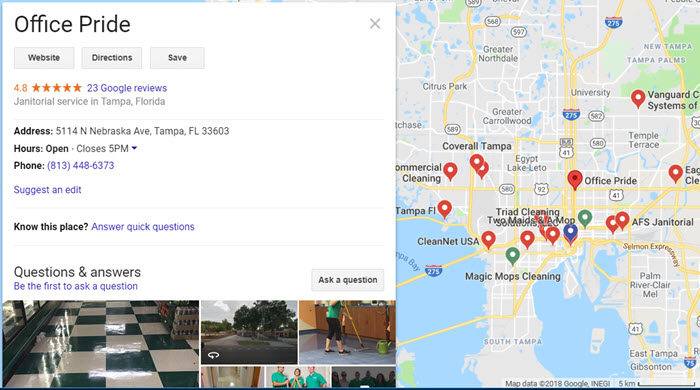
Imagine a powerful tool that could put your business name and contact information in front of every prospect searching for a commercial cleaning company in your city. This tool could tell your prospects exactly how to find you, share your business hours, and kick off the sales cycle for you. It might even tell people about your promotions and services before they even find your website.
Sounds too good to be true, right? In fact, it is true—and it's completely free—yet a good percentage of people reading this post haven't taken advantage of it.
Your Google My Business page helps Prospects find your Cleaning Company
Google My Business is an all-in-one portal to help you control your Google listing. Once you set up your profile, your information will be visible in search results and on Google Maps listings. But just doing the basic setup won't get you placed high in the map rankings.
A strong Google My Business profile can help you stand out from your competition. After all, it puts your name front and center when they are searching online, plus having your contact information easily accessible shows prospects that you want to be contacted. And Google has added a number of features over the years that most businesses never take advantage of.
Do you have a Google My Business Page?
Ready to jump in?
First, you need to make sure you don't already have a Google My Business account. This is an important step so that you don't need to merge two accounts later. It's much easier to edit an outdated account than to merge a new account with an old one.
Follow these steps to get started.
Search for your business name to either edit your existing information or create your new listing. If you do find a duplicate listing, you'll need to log in to your dashboard and remove the extra listing. Now, you can get started setting up your listing.
You will need to verify your ownership of the business. Google now allows you to do this online, but if that doesn't work, you can have them send a postcard to your address. When you enter the verification code on the postcard onto your Google My Business dashboard, you're all set.
If you have a home-based business and use a P.O. Box or UPS Store address, do NOT use that as your business address – Google doesn't approve of that. However, they do now allow you to hide your personal address from public view so that only your city and state show publicly.
Make sure to include as much information as possible in your listing. You'll also want to be sure that any information you put on your Google My Business listing is the same as the information you put on your website and other online listings sites. Google checks for consistency, and having different contact information listed in different places online can be a red flag.
At the bare minimum, you'll want to include your business name, phone number, address, regular business hours, short description, and a photo or two. This is the information that Google needs for you to be displayed prominently in Google Search results or on Google Maps. Be specific when selecting your category (as an example, instead of “Cleaning Service,” you might want to use “Janitorial Service”).
Google My Business Features to Optimize your Online Presence
Once you're ready for more advanced results, you'll want to expand your Google My Business profile.
Soliciting online reviews from your satisfied customers should be a regular part of your business. The more information you have available on Google, the more your prospects will click on your business information. Customer reviews increase the click-through rate to your website by 17%, according to Google.
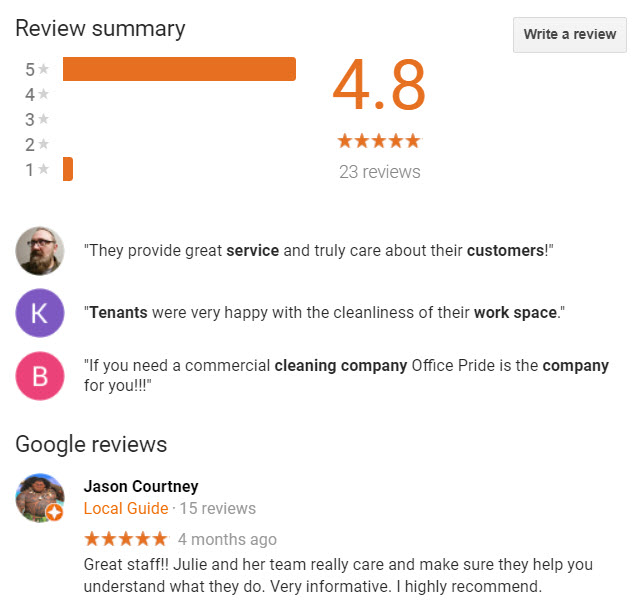
The Q&A feature allows you to load in some of your most frequently asked questions and pin the best responses. This also allows your prospects to ask questions or your current customers to answer questions and share their experiences. This great feature gives you a chance to promote the benefits of working with you to new prospects who haven't even made it to your website yet.
If you have an office space that is open to the public, consider posting even more pictures of your office space or cleaning team. If you've made videos to promote your business, you can share those as well. You may also want to post before-and-after shots (with the client's permission). High-quality photos and videos help your listing stand out, and will help Google know that your business should appear in search results before your competitors.
When it comes to images, you can geo-tag them with the city location, which shows Google that you truly are a legitimate business in that city. Chances are, none of your competitors are doing this with their images.
One of Google My Business's newest features is the ability to add posts with a Call to Action. The main benefits to Google My Business posts are how quickly you can get information to new prospects or existing clients and how easy you can put together these posts. If you're already utilizing the blog function of your website, you can use some of those posts on your Google My Business profile.
You can also use this feature to promote specials or advertise new products or services. When you upgrade your vacuums or buy new carpet steamers, you'll want to promote all the new features like HEPA filters or stain-lifting technology that won't void the carpet's warranty. If you're offering a carpet-cleaning promotion to bring in extra business during your slow season, make a quick post on Google My Business.
The three factors that most influence local ranking on Google are relevance, distance, and prominence. Although you can't do anything to influence your distance from the location of the person searching, your Google My Business profile is a big boost for the other two factors. By providing as many details as possible, you're making it easy for Google to see when your business is an appropriate result for someone's search query.
The more of an online presence your company has, the more prominently you'll be displayed in search results. That's why it's so important to understand the basics of how to build an online presence, especially if you're in an area with a lot of competition. We recommend this free ebook: “7 Stages of a Total Online Presence” for cleaning company owners who aren't sure where to start.
Marketing a cleaning company can be hard. Before shelling money on solutions, make sure you're taking advantage of the free tools at your disposal, including Google My Business. With just an hour or two of setup, you can take a number of steps to ensure that your cleaning company stands out from the rest of the pack.
FREE Business Listings Scan
Did you know that consistency with your NAP listings (name, address, and phone) across the Internet directories and search engines is critical to how you're being listed in search results? Our free scan let's you know what needs to be fixed! We provide clients with a Power Listing service that allows us to easily update, optimize, and control your online listings across the web!
Visit our Store for Certification Training Programs